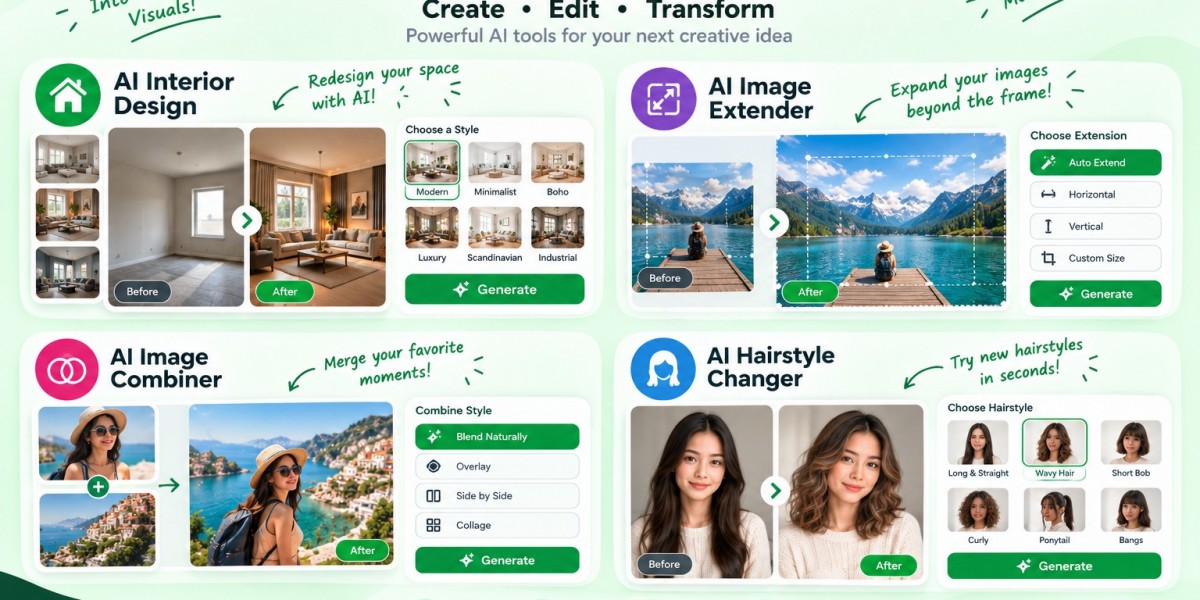

AI interior design transforms a room photo into a visual redesign. An AI image extender creates new space beyond an image’s original borders. An AI image combiner blends a subject and a separate scene into one picture. An AI hairstyle changer previews different haircuts on your photo. LazyKiwi offers these four focused tools to help users explore visual changes before committing time, money, or effort.
Introduction: The Best AI Edit Starts With a Clear Decision
A room can look completely different with new lighting and furniture. A portrait can become more useful when the image has enough space for a vertical layout. Two separate photographs can tell a stronger story when their lighting and perspective match. And a haircut that looks excellent on a model may not suit your face in quite the same way.
The common problem is not a lack of creative ideas. It is the difficulty of testing those ideas before making a real-world decision.
That is where focused AI image tools can help. Instead of starting from a blank canvas, you give the tool an existing photo and define what should change. The result becomes a visual preview you can inspect, compare, and refine.
At LazyKiwi, the tools directory brings together browser-based image and video workflows, including room redesign, image extension, photo combination, and hairstyle previews. Each solves a different problem, so choosing the right one matters more than writing a long prompt.
This guide explains what each tool does, how to prepare better inputs, what limitations to watch for, and how to decide whether a generated result is ready to use.
1. What Can AI Interior Design Do With a Photo of Your Room?
AI interior design uses an existing room photo as the starting point for visualizing different furniture, colors, materials, lighting, and decorating styles. It helps you explore design directions without first buying furniture or creating a detailed 3D model.
How does AI room redesign work?
The tool interprets the room in your photograph and generates a redesigned version based on your instructions. You might request a warm Scandinavian living room, a minimalist home office, or a bedroom with darker walls and natural wood furniture.
The important distinction is that you are redesigning a real space rather than browsing an unrelated inspiration photo. LazyKiwi’s tool page describes a workflow built around uploading a room image, describing the desired style, and comparing the generated result with the original.
How can you get a more useful interior design result?
Use a photograph that shows the room’s actual layout. Stand near a corner, include the main walls and windows, and use even daylight where possible.
Then describe visible changes rather than relying on vague words such as “beautiful” or “modern.”
For example:
Restyle this living room in a warm Scandinavian look. Use light oak furniture, a cream sofa, soft neutral walls, black metal accents, and natural daylight. Keep the existing windows, doors, and room layout.
This gives the generator a clearer design direction. You can then make a second pass to adjust one or two elements instead of changing everything at once.
What should you check before acting on the design?
Treat the output as a concept image, not an architectural plan. AI may approximate furniture dimensions, material behavior, or the position of fixed features. A visually convincing sofa is not proof that the actual model will fit between your walls.
Use the result to narrow down colors, styles, and furniture ideas. Verify measurements, construction constraints, and product availability separately before spending money.
2. What Is an AI Image Extender, and When Should You Use One?
An AI image extender expands a photograph beyond its existing borders by generating new content around the original image. This process, commonly called outpainting, helps adapt a tightly cropped photo to a different composition or aspect ratio.
How is image extension different from upscaling?
These tools solve different problems:
Image extension: Creates additional space outside the original borders.
Image upscaling: Increases image dimensions and may reconstruct finer details within the existing picture.
Cropping: Removes part of an image to fit a frame.
Stretching: Changes image proportions and can distort people or objects.
Suppose you have a horizontal product photograph but need a vertical 9:16 composition for a social media story. Cropping may cut off the product, while stretching makes it look unnaturally narrow. An image extender can generate more background above and below the product to create room for the vertical frame.
How do you extend an image without making the edges look artificial?
Start with the highest-quality source image available. Tell the tool which side needs more space and what should continue into that area.
A useful instruction might be:
Extend the image upward and downward to create a vertical composition. Continue the existing pale studio background, preserve the product’s shape and position, and maintain the same light direction and soft shadows.
Inspect the new borders after generation. Look for broken architectural lines, inconsistent textures, duplicated objects, or shadows that change direction unexpectedly.
A practical rule: Extend backgrounds more aggressively than distinctive subjects. A plain wall, sky, or studio backdrop gives the model clearer visual cues than a detailed face, a patterned object, or a complex structure.
LazyKiwi’s extender supports described extensions and common formats such as square, portrait, and landscape compositions, according to its tool page. Very large extensions remain harder because the model has less original context to guide the newly generated area.
3. How Does an AI Image Combiner Merge Two Photos?
An AI image combiner merges elements from separate photographs into one composition. Instead of simply placing one image over another, it can generate transitions that help match the subject’s scale, lighting, edges, and shadows to the destination scene.
What is the right way to prepare two images?
Think of the inputs as having two distinct roles:
Subject image: The person, product, pet, or object you want to preserve.
Scene image: The room, landscape, studio, or background where you want the subject to appear.
For example, an online seller could start with a clean photograph of a ceramic vase and combine it with a styled dining-table scene. The resulting image can help the seller explore a lifestyle presentation without arranging a physical shoot for every concept.
LazyKiwi’s image combiner uses this subject-and-scene workflow and aims to blend the elements into one image rather than leave obvious cutout edges.
Why do some combined photos look fake?
The main issue is often not the cutout itself. It is the relationship between the images.
Imagine a person photographed in soft window light being placed into a scene with harsh sunlight. Even if the edges blend well, the result may feel wrong because the face, shadows, and background tell different lighting stories.
Before generating, check three things:
Camera angle: Does the subject appear to have been photographed from a compatible viewpoint?
Lighting: Can the subject reasonably fit the scene’s light direction and intensity?
Scale and contact: Will the subject look correctly sized, and should it cast a shadow or touch a surface?
Choose compatible photographs whenever possible. AI can help reconcile differences, but it cannot always resolve conflicting perspectives or invent missing details accurately.
For a more complex composition, combine two images first, inspect the result, and then use that output as an input for another pass. Review every stage so a small mistake does not become harder to fix later.
4. How Can an AI Hairstyle Changer Help You Preview a Haircut?
An AI hairstyle changer modifies the hair shown in a portrait to preview a different haircut, length, fringe, or texture while aiming to preserve the person’s recognizable facial features.
Which photo gives the most realistic hairstyle preview?
Use a clear, front-facing portrait with even lighting and a visible hairline. Keep your head in a natural position and avoid heavy shadows, hats, or objects that cover the hair you want to change.
Then request a specific style. “Give me a haircut” leaves too much open to interpretation. “Add a chin-length blunt bob with a center part and natural dark-brown color” gives the tool a more concrete target.
You can also compare distinct options, such as curtain bangs against a side fringe or long layers against a shoulder-length cut.
Can an AI preview tell you whether a haircut will suit you?
It can help you visualize a look on your own face, but it cannot guarantee how the haircut will behave in real life. Hair density, curl pattern, growth direction, styling habits, and the stylist’s technique affect the final result.
Use the preview to communicate preferences, not as a substitute for professional advice. A generated image can show the intended shape; a stylist can assess whether your current hair can achieve it and what maintenance it will require.
The LazyKiwi tool page describes uploading a portrait, choosing or describing a hairstyle, and generating a preview while aiming to keep the face and background consistent.
LazyKiwi
How can you compare hairstyle options fairly?
Keep the same source photo for every variation. Change only the hairstyle between runs. If you change the lighting, angle, hair color, and cut simultaneously, you will have a harder time identifying which option actually appeals to you.
This simple comparison method also makes it easier to show a stylist what you like and what you would change.
5. How Should You Choose the Right AI Image Tool for the Job?
The fastest way to avoid disappointing results is to match the tool to the change you want to make. These four tools may all produce images, but they operate on different parts of the visual problem.
Your goal | Main input | What to inspect | |
Explore furniture, finishes, and room styles | Room photo + style description | Layout, furniture scale, fixed features | |
Add space beyond an image’s edges | Existing image + extension instructions | Edge continuity, perspective, new details | |
Place a subject into another scene | Subject photo + scene photo | Lighting, shadows, scale, blending | |
Preview a different haircut | Portrait + hairstyle choice | Hairline, face consistency, texture |
What is the most efficient workflow for visual editing?
Use a three-stage process: define, generate, verify.
Define: Identify the one change that matters most. Are you testing a room palette, adding canvas space, combining a product with a background, or comparing hairstyles?
Generate: Supply a clear input and a specific instruction. Avoid changing several unrelated variables at once.
Verify: Compare the result with the original and inspect the areas most likely to fail. A room redesign needs a different quality check from a hairstyle preview.
This approach makes your results easier to evaluate. It also prevents a common mistake: judging an image by its overall attractiveness when it fails the actual task.
6. What Myths About AI Image Editing Should You Ignore?
AI tools make visual experimentation easier, but they do not eliminate the need for judgment. Three misconceptions can lead users to trust a result too quickly.
Myth 1: A realistic image is automatically accurate
A convincing image can still contain incorrect dimensions, distorted details, or objects that do not exist. Realism describes how the result looks; accuracy describes whether it represents the intended reality.
For interior design, verify dimensions and construction constraints. For a combined image, inspect perspective and shadows. For a hairstyle preview, remember that generated hair does not reveal how your own hair will fall after a real cut.
Myth 2: A longer prompt always produces a better result
More words do not necessarily create more control. A prompt filled with unrelated adjectives can give the model competing instructions.
Instead, specify the target, the most important visual details, and what must remain unchanged. For example: “Extend the background to the left, preserve the product, and match the existing studio lighting” is more actionable than a paragraph about making the whole image perfect.
Myth 3: Every AI tool can solve every image problem
An image extender is designed to add space, not necessarily repair a blurry face. A hairstyle changer previews hair, not the practical maintenance needs of a haircut. An image combiner can blend two pictures, but it may struggle when their camera angles conflict.
Choose a tool based on the operation required, then use a separate workflow if the output needs another kind of correction.
7. How Can You Make AI-Edited Images More Useful and Trustworthy?
A strong image workflow should consider not only how the result looks, but also how it will be used. This is the quality-control step that is easy to skip when a generated image looks impressive at first glance.
Use the Four-Point Visual Integrity Check
Before publishing, sharing, or acting on an edited image, review four areas:
Identity: Does the person, product, or important subject still look correct?
Geometry: Do dimensions, proportions, perspective, and spatial relationships make sense?
Continuity: Do lighting, texture, shadows, hair strands, or background edges flow naturally?
Purpose: Does the result solve the original problem at the intended size and placement?
Consider a product image extended for an online store. It may pass the continuity test because the background looks seamless, but fail the identity test if the product label changes. A hairstyle preview might look polished but fail the purpose test if the fringe hides a feature you specifically wanted to compare.
The key is to check the most consequential details first, rather than spending time correcting minor visual imperfections.
When should you disclose an AI edit?
Use judgment based on the context. A mood-board image showing a possible living-room style is different from a property listing that implies the room already has those finishes. A hairstyle mock-up is different from a photograph presented as an untouched record of someone’s appearance.
When a generated image could materially mislead a viewer, label it as a visualization or edited concept. For commercial use, also check the relevant platform’s rules, your source-image rights, and any applicable disclosure requirements.
What should you do with private or sensitive photos?
Only upload images you have the right to use. Before uploading a personal portrait or a photo of your home, review the tool’s current privacy information and avoid including unnecessary identifying details. Do not assume every AI service has the same storage, retention, or sharing practices.
8. How Do These Tools Fit Into AI Search Visibility in 2026?
Visual tools can support a website’s content strategy when each tool page explains a specific user problem, demonstrates the result, and answers the questions people ask before using it. The presence of AI-generated images alone does not guarantee better organic rankings or citations.
Google’s published guidance says the established fundamentals still apply to AI Overviews and AI Mode: pages need to be eligible for Search, content should help people, and important information should be accessible and supported by a good page experience. There is no separate special optimization that guarantees inclusion in AI answers.
What makes a tool page easier for search engines and people to understand?
Explain the task in plain language. Show a genuine example of the input and output. Describe limitations, supported workflows, and the next step a visitor should take. Add useful internal links between related tools without forcing unrelated keywords into the copy.
For example, an image extender page should explain how extension differs from upscaling. An image combiner page should show which image serves as the subject and which serves as the scene. These distinctions help users choose correctly and give search systems clearer information about the page’s purpose.
What evidence should a publisher add?
Use real product screenshots, representative outputs, and concise captions that explain what changed. If the team tests the tools, document the process: source-image conditions, prompt, settings, and observed limitations. Avoid presenting an untested example as a verified performance result.
Google’s people-first content guidance emphasizes original value, accuracy, transparent authorship, and evidence that the content was created to help users rather than merely attract search traffic
For LazyKiwi, the strongest improvement is practical proof: show what each tool does with a real example, explain where it performs well, and acknowledge where a human review is still necessary.
[LazyKiwi Original Framework] The F-F-V-P Method for Evaluating AI Edits
Use the F-F-V-P Method—Fit, Fidelity, Visual consistency, Purpose—to decide whether an AI-generated result is useful enough to keep. It builds on the same practical principle across all four tools: an image should be judged against the job it was meant to do.
F — Fit
Does the output match the required format, space, or style? For interior design, consider the room and desired look. For image extension, check the final aspect ratio and composition.
F — Fidelity
Does the important subject remain recognizable and correct? Inspect the product, facial features, room structure, or hairstyle details that matter most.
V — Visual consistency
Do the lighting, shadows, scale, texture, and edges agree? This is especially important when extending a background or combining two photographs.
P — Purpose
Can you actually use the result for its intended job? A design concept may be good enough for inspiration but not precise enough for construction, product documentation, or a final commercial asset.
How do you apply the framework in practice?
Imagine you are preparing a product image for a store. You extend the background to create a square layout. The product stays recognizable, and the edges look natural. However, the new composition leaves too little space for the price and product name.
The image passes fidelity and visual consistency, but it fails fit and purpose. The next step is to adjust the composition—not regenerate the product from scratch.
Use the same logic for the other tools. If a room redesign looks attractive but changes a fixed window, inspect the geometry. If two photographs look pasted together, revisit lighting and scale. If a hairstyle preview changes the face as well as the hair, compare it against the original portrait.
This framework is an editorial quality-control method, not a measured or independently validated performance score. Its value is consistency: it gives you a repeatable way to assess results instead of relying on a vague impression that an image “looks good.”
Frequently Asked Questions
What is AI interior design?
AI interior design uses a room photograph and a visual instruction to generate a redesigned version of that space. You can explore furniture arrangements, colors, materials, and decorating styles before making purchases. The result is best treated as a concept preview; always verify measurements, structural constraints, and product availability before using it as a renovation plan.
How do I extend an image with AI without cropping the subject?
Use an AI image extender to generate additional content beyond the existing borders. Upload a high-quality image, specify which edge needs more room, and describe the background that should continue into the new area. Check the generated edges and important details afterward, since large extensions or complex missing areas may not reconstruct accurately.
Can an AI image combiner merge two photos into one realistic picture?
Yes. An AI image combiner can use one photograph as the subject and another as the scene, then attempt to harmonize lighting, scale, edges, and shadows. Results are generally easier to evaluate when the source images have compatible camera angles and perspectives. Review the final image for mismatched shadows, distorted details, or incorrect proportions before publishing it.
How can I try a new hairstyle on my own photo?
Upload a clear portrait to an AI hairstyle changer and choose or describe the cut you want to preview. Use even lighting and make sure your hairline is visible. Compare multiple styles using the same source photo so the hairstyle is the main variable. Treat the result as a visual reference, not a guarantee of how your hair will look after a real haircut.
Are AI image tools always accurate?
No. AI image tools generate plausible visual results, but they can alter details, approximate dimensions, or introduce inconsistencies. A redesigned room may not reflect exact measurements, a combined image may contain lighting errors, and a hairstyle preview may not match your hair’s real texture. Check the details that matter for your use case instead of judging only by realism.
What is the difference between an AI image extender and an AI image combiner?
An AI image extender creates new image content outside the original borders, helping a photograph fit a different frame. An AI image combiner brings content from separate photographs into one composition. Use an extender when you need more canvas around an existing subject; use a combiner when you need a subject and a separate scene to appear together.
Can I use AI-edited images for business or commercial projects?
Potentially, but the answer depends on the tool’s terms, your rights to the source images, the intended use, and any applicable platform or legal requirements. Inspect outputs for inaccurate product details or misleading representations. For important commercial assets, keep a record of the original images and review the final result before publication. Check the relevant service terms rather than assuming all AI tools offer identical rights.
What makes an AI-generated image suitable for publishing?
A publishable image should fit its intended dimensions, preserve important subject details, maintain consistent lighting and perspective, and communicate the intended message without misleading viewers. Review it at the size people will actually see it. For commercial work, also check branding, text, product accuracy, source-image permissions, and whether the context calls for an AI-edit disclosure.
Conclusion: Choose the Tool That Matches the Change You Need
AI visual editing is most useful when you start with a clear goal and review the result against that goal. Use AI interior design to explore a room’s potential, an AI image extender to create more space around a photograph, an AI image combiner to bring a subject and scene together, and an AI hairstyle changer to compare possible haircuts.
At LazyKiwi, these focused workflows are available through individual browser-based tools, so you can start with the specific task rather than learning a complex editing suite. Browse the LazyKiwi AI tools directory and choose the tool that fits your next project.
Before using any generated result as a final asset, check its accuracy, visual consistency, and suitability for the real-world decision it is meant to support. Share this guide with anyone who wants to experiment with visual ideas while keeping that final quality check in their workflow.